Lead the response. Protect the business.

When a cyber incident threatens operations, every leader needs a clear next move. IR-OS brings security, service recovery, and reporting into one shared workspace so your team can act on the same facts and brief leadership with confidence.

Explore all three roles · Try the shared scenario · No account for the demo

See what coordinated leadership looks like.
Explore a shared incident, record an example update, and prepare a working brief in the demo.

“Materiality determination is being made informally by people who are not authorized to make it.” The pattern we see most often in executive tabletop exercises.

Three perspectives. One coordinated response.

One incident. Three leaders.A coordinated response.

Connect security command, business recovery, and reporting obligations in one shared workspace. Each leader sees the owners, decisions, and evidence they need to move the response forward.

Explore one shared incident

Make the next decision clear.

Connect the incident to its accountable owner, unresolved blockers, and next decision. Keep security command and leadership working from the same facts.

Interactive demonstration uses synthetic data. Explore each role, record an example update, and prepare a working brief without creating an account.
Illustrative ransomware exercise · shared incident

Command decision

Accountable owners
Incident commander + security lead
Current facts / decision
Keep customer transactions paused until clean restoration is validated.
Next checkpoint
Review validation evidence with the recovery lead at the next checkpoint.
Evidence status
Validation pending. The decision remains open.
  1. Prepare togetherImport or build the plan, assign responders, and rehearse with exercises.
  2. Establish commandDeclare the incident, review priorities, and give every decision an owner.
  3. Recover and documentTrack service recovery alongside reviewed obligations and evidence gaps.
  4. Brief and improvePrepare a working update, review the incident record, and follow through on lessons.

AI agent incident response

Your agents move fast.
Your response needs a clear next step.

An agent uses an unauthorized tool. A credential is exposed. Delegated runs reach beyond their intended scope. Bring security, technology and GRC together around one guided response.

FOR THE CISO

Establish the exposure.

Identify affected agents, permissions and third parties. Assign containment owners and capture confirmation of the actions taken.

FOR THE CIO

Make restart a deliberate decision.

Coordinate affected systems and delegated runs. Document boundary checks, a staged recovery and the conditions that would stop it.

FOR THE HEAD OF GRC

Keep the evidence with the decision.

Track evidence references, notification reviews and restart approval. Separate confirmed facts from open questions in the incident record.

Five stages. Named owners. A documented path forward.

1. Identify & preserve   →   2. Contain access   →   3. Investigate   →   4. Validate restart   →   5. Learn & demonstrate

The dedicated playbook covers shared infrastructure, peer-agent communication, independent log checks and recovery approval. Authorized responders perform and verify containment in the affected platforms; IR-OS coordinates the work and its evidence.

Try the AI agent incident scenarioExplore the full playbook

Informed by the published OpenAI and METR incident analyses. No endorsement implied. Try the synthetic scenario without an account. Full playbook requires sign-in.

The real problem

It is not detection. It is what happens in the next 24 hours.

Most breaches are not lost at detection. They are lost in the next 24 hours, when the response is uncoordinated, out of order, and under-documented. Nobody knows who owns the next decision or which document governs it.
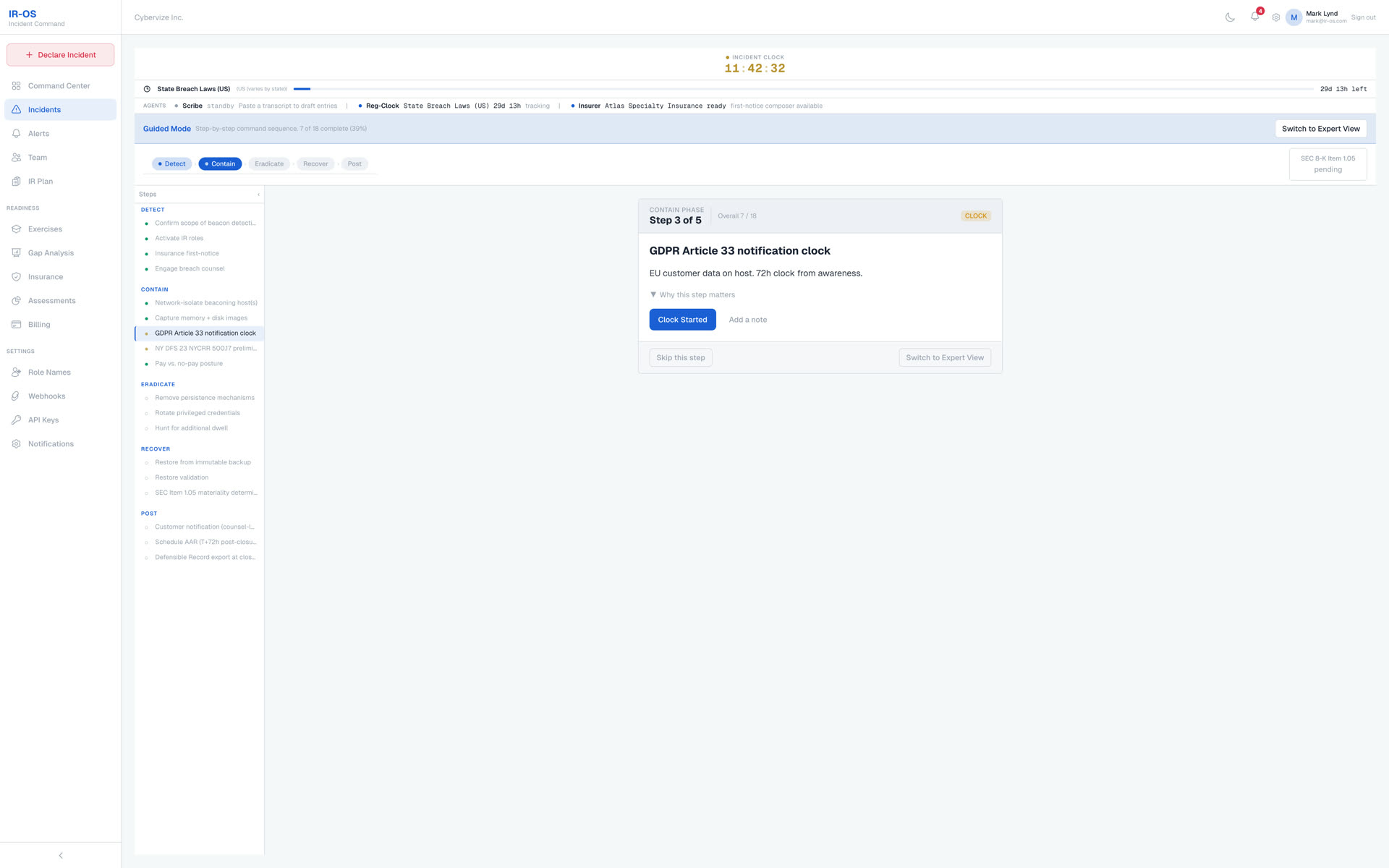
IR-OS live incident view showing the active response, assigned roles, the next required action, and running regulatory clocks
A live incident, coordinated in one place

One missed clause can void a claim.

IR-OS brings the next action, supporting documents, and planning clocks together so responders can find what they need.

A real failure mode

The CFO and General Counsel hold the cyber insurance policy. The CISO and IT report the incident to the FBI in the first hour, which feels right. Twenty-four hours later the carrier denies the claim, because the policy required first-notice to the carrier before any law-enforcement contact, and nobody on the response side knew that clause existed.

Now multiply that by dozens of regulatory clocks and a dozen notification templates, all running at once, under pressure.

Slower response means a larger blast radius, more scope, and more cost. Pace is not a process metric. It is a balance-sheet metric.

How IR-OS works

How IR-OS coordinates your response

IR-OS is a Cyber Incident Response Management platform. Your tools answer "what is happening." IR-OS answers "who decides, when, and how do we prove it." Three outcomes, in order.

Faster cadence

The next action and the right document, one click away.

The next action and the right document, one click away. No 50-item runbook at 3am.

Smaller blast radius

Keep scope and notification duties visible.

Review regulatory timing and insurance notice requirements alongside the response. Assign an owner to confirm applicability and the next action.

A defensible record

A record you can independently verify.

Export a signed, tamper-evident incident record. Anyone can verify the bundle at app.ir-os.com/verify, no account needed.
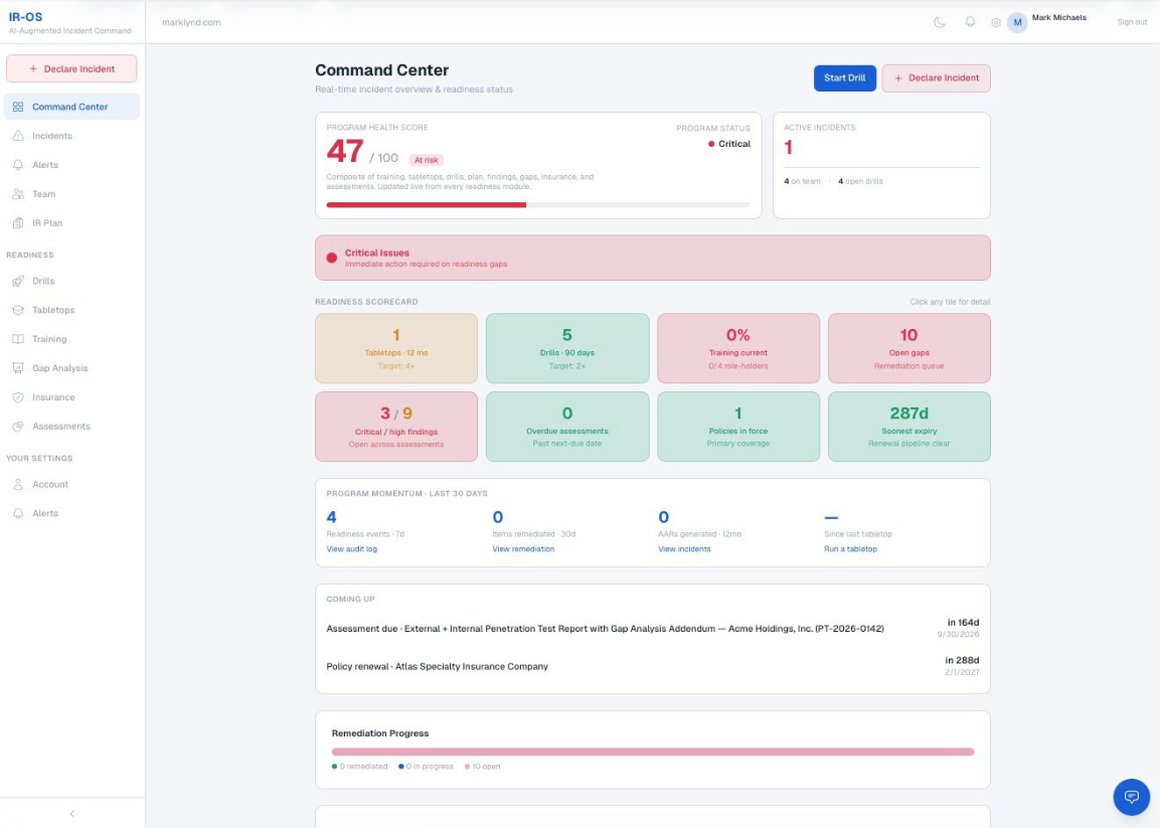
IR-OS Command Center showing the Program Health Score, Readiness Scorecard, and Program Momentum panels - the live operational dashboard inside the platform
Command Center, live inside IR-OS

The four steps, start to finish

Most IR tools assume you already have a plan, a team, and a practiced routine. IR-OS assumes you do not, gets you there, then keeps you sharp.
  • 1 Build your plan in one sitting. A guided interview asks about your industry, regulators, team, and stack, then generates a plan aligned to the standards that apply to you.
  • 2 Map roles to functions. IR-OS recommends the job title that owns each response function. You name the actual person. We never ingest your org chart.
  • 3 Practice with facilitated tabletops. Run exercises on real scenarios. Findings and gaps are captured, so your team practices its responsibilities before a real incident.
  • 4 Command the incident. Review planning clocks, coordinate tasks, and prepare the incident record and leadership brief for human review.
IR-OS regulatory clocks tracker showing SEC, GDPR, HIPAA, and state breach notification deadlines counting down in parallel for one incident
Every regulator's clock, running in parallel

Review the trigger. Confirm the deadline.

Planning clocks help organize the response. Use the GRC workspace to record the applicable trigger, reviewed deadline, owner, and filing evidence. SEC Item 1.05 generally uses four business days after materiality determination; confirm legal applicability and timing with counsel. You see what is due, and when.
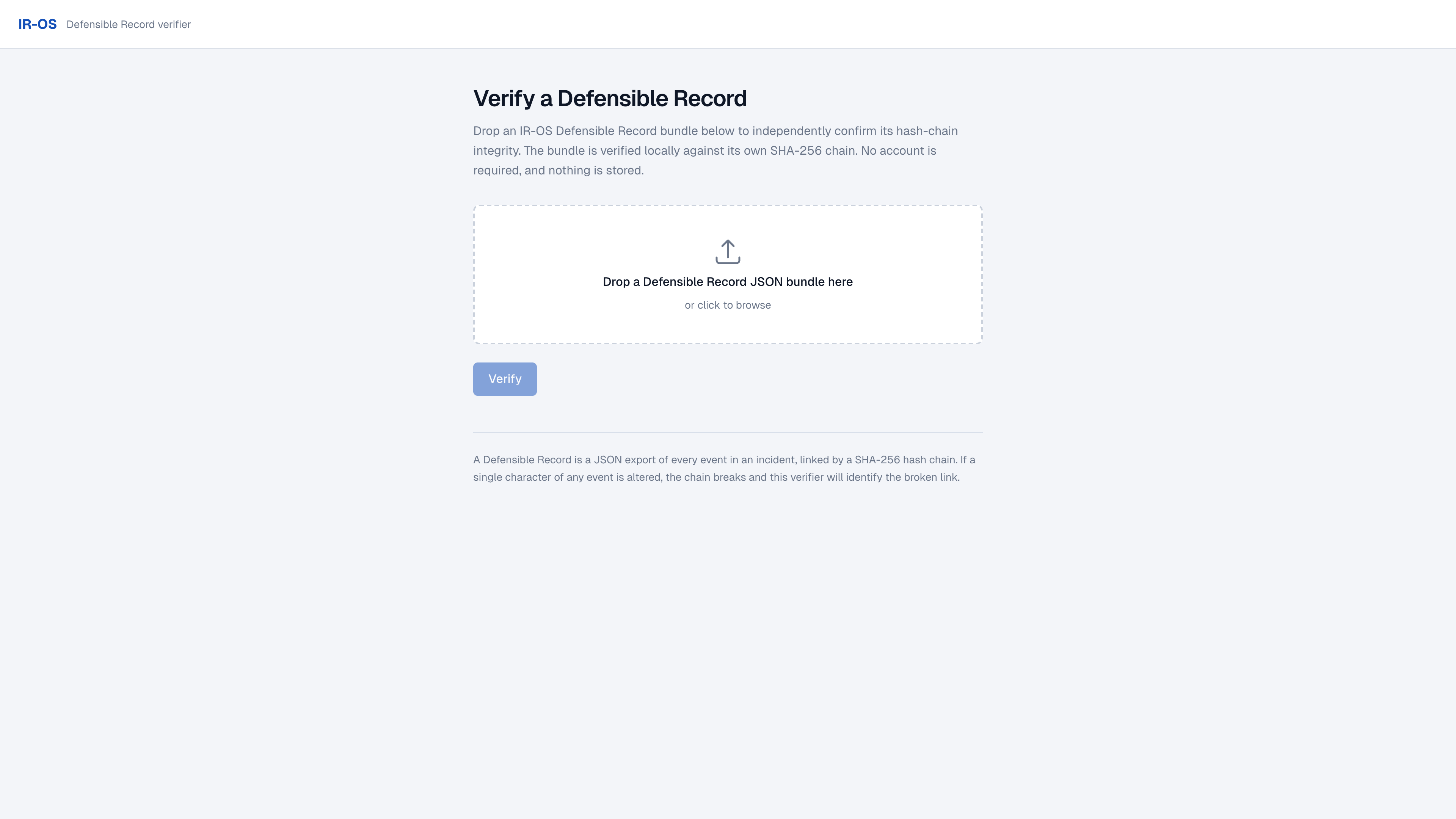
IR-OS independent record verification screen confirming an incident bundle's hash chain is intact and tamper-evident
Independent verification, no account needed

An export you can check.

Export the incident record and check its chain and issuer signature with the independent verifier. Verification establishes integrity, not legal acceptance or insurance coverage.

Crisis communications

Crisis communications, with receipts.

Attorney-shaped templates for every notice a breach demands, each cited to the rule it satisfies. You author and send from your own domain. IR-OS never touches delivery.
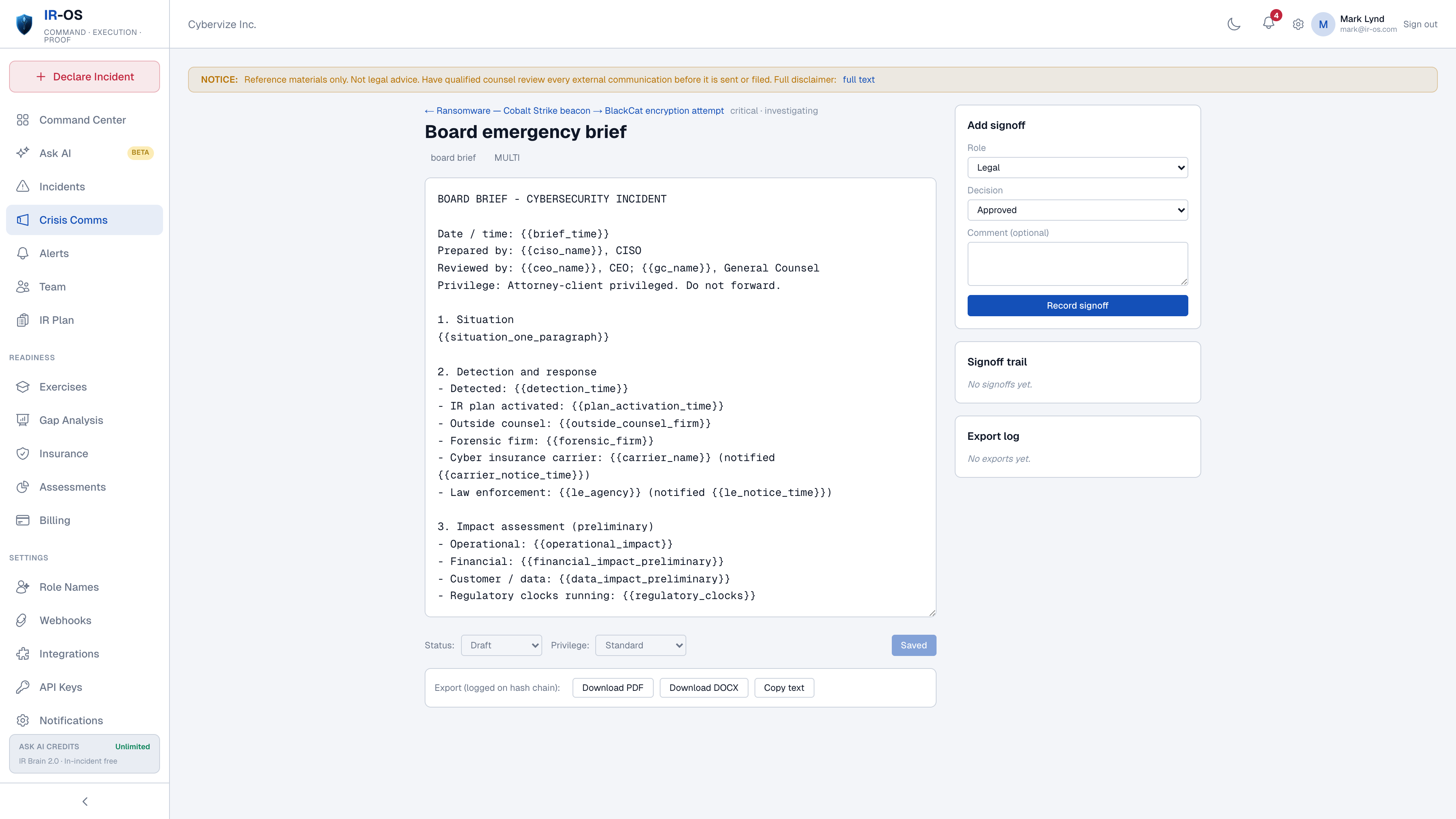
IR-OS crisis communications draft editor showing a breach notification template with the regulation it satisfies cited inline
Draft a notice, cited to the rule it satisfies

Every notice, ready to sign off.

Legal, comms, and executive approvals are captured in order, so the record shows who cleared what.
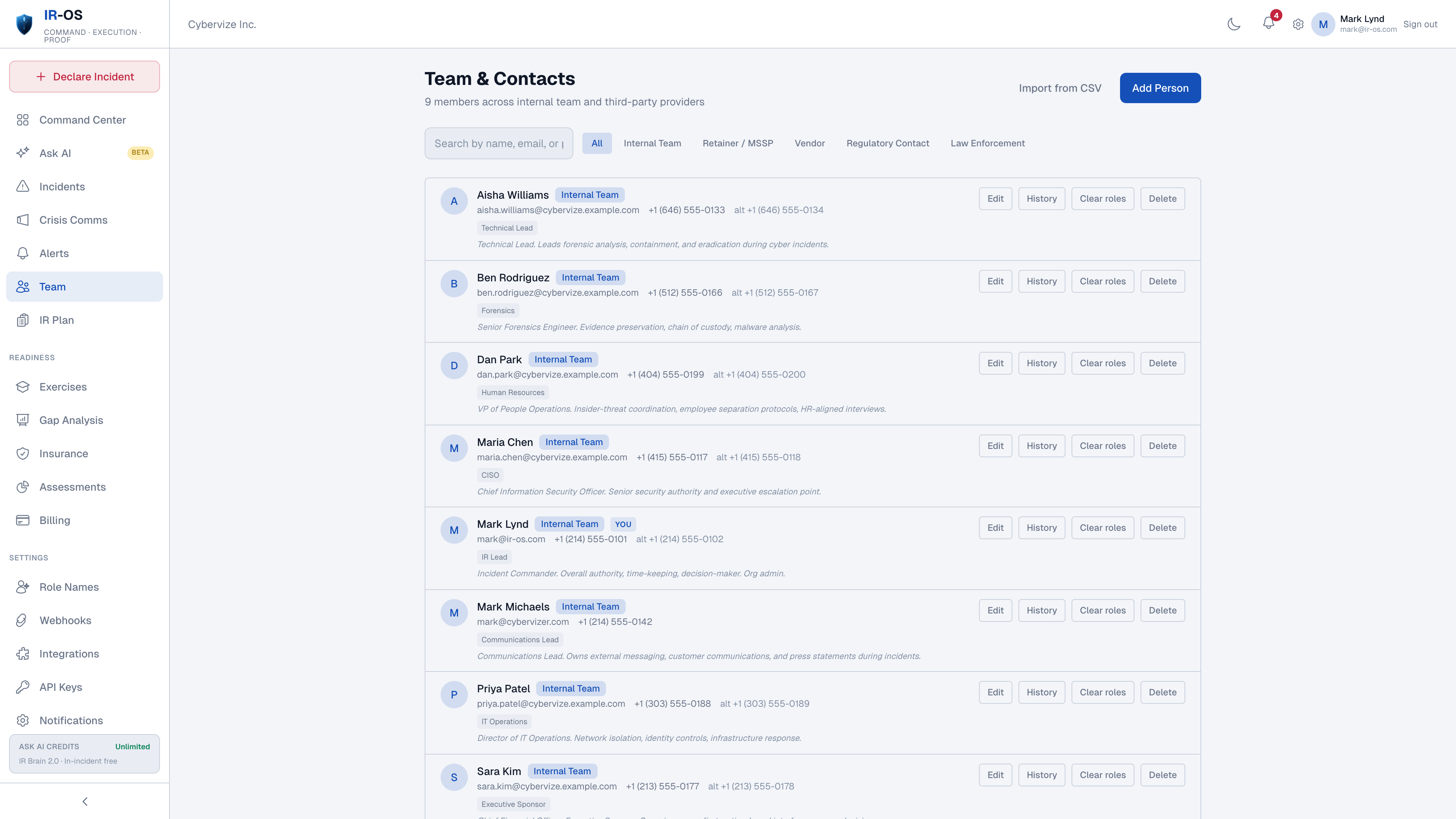
IR-OS role recommender suggesting which job title owns each incident response function, ready for you to name the person
The right role on every function

Roles mapped to functions.

IR-OS recommends the title that owns each function. You name the person. We never ingest your org chart.

Start your 7-day free trial

Five-minute setup · No sales call

Forbes CNBC CIO.com AP News Barchart StreetInsider
Advisory Board Member
I've run executive cyber incident response tabletops across Fortune 500s, critical infrastructure, and the public sector. The same three failures show up every time. Coordination breaks down. Nobody can prove what was decided and when. And the after-action work never actually updates the plan. IR-OS is the first platform I've seen that fixes all three by construction, not by process discipline. That is the actual promise of AI, and one of the biggest gaps most organizations still face. IR-OS is the first platform I've seen that keeps that promise for incident command.
ML
Mark Lynd
5x CIO / CISO · Top 5 Ranked Global Cybersecurity and AI Thought Leader
IR-OS Advisory Board Member
Original research

Why do IR plans break during real incidents?

Ten findings from C-suite tabletop exercises across 32 industries. The coordination and regulatory failures no post-incident report surfaces, because they get fixed before the report is written.

Read the full report

What our customers say

Customer names and organizations are intentionally anonymized. Good cyber hygiene means not exposing your incident-response stack to anyone profiling your defenses.

AI built for incident response

Practical IR guidance at every step.

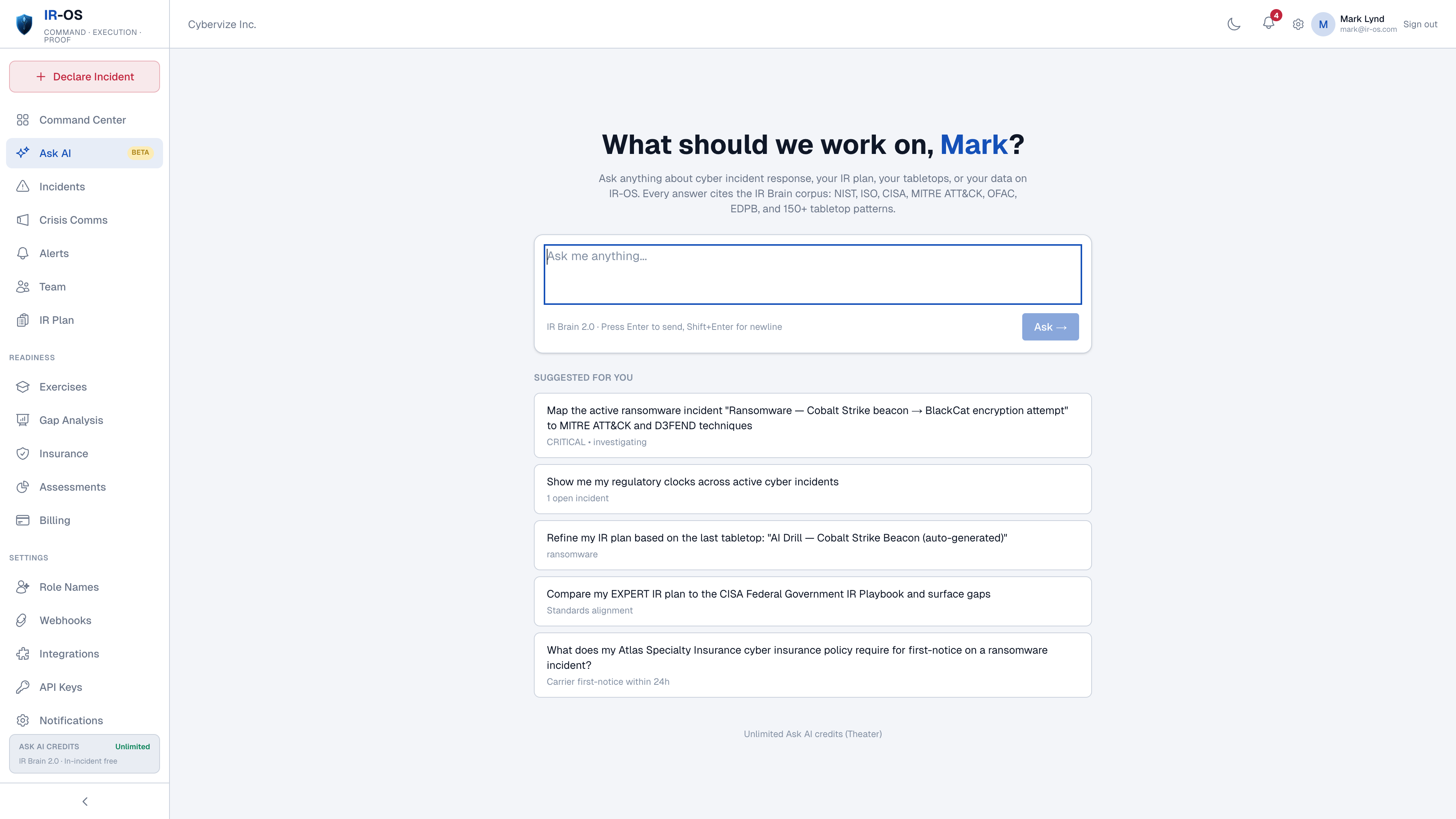
Ask AI uses available, authorized organization context to help you review plans and response options. Inspect its sources and confirm important facts before acting.

IR-OS Ask AI interface with context-aware suggestions for the active incident, regulatory clocks, IR plan refinement, and cyber insurance first-notice requirements.

Build, tune, and act

Sets up roles and runbooks the first time, spots readiness gaps day to day, and answers "what do I do next" during a real incident.

Knows your organization

Aware of your active incidents, IR plan, tabletops, and cyber insurance policy out of the box. No re-explaining.

Sources you can inspect

Draws on available incident-response sources. Check source dates, applicability, and the underlying text before relying on an answer.

Your data stays yours

Review our security information and data-processing terms before submitting sensitive content. Authorized organization context supports incident-response advice.
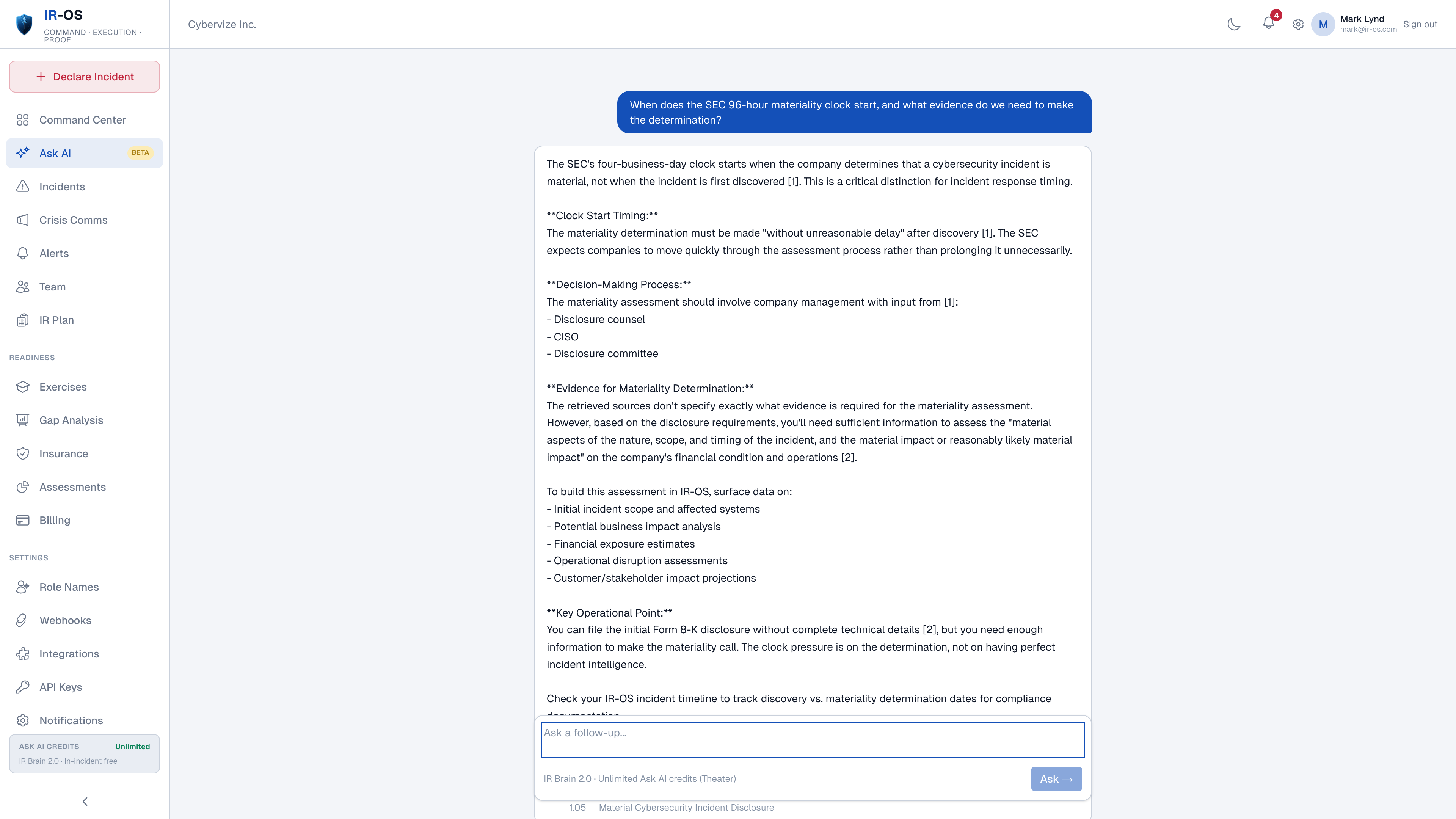
IR-OS Ask AI answer with inline citations to NIST 800-61, GDPR Article 33, and the org's own IR plan
Example answer with source references

Check the source. Review the answer.

Inspect source references and compare the advice with your plan and current obligations. AI can be wrong or incomplete; your team makes the decision.

Agent assistance, visible activity

AI agents that work for you with your team in control.

Use agent assistance across readiness, exercises and response. The Agents & activity view brings recorded actions and their status into view, with related incident events shown separately. Review generated advice and keep consequential decisions with your team.

Close-out and reporting

Prepare an after-action review, inspect gaps, and export the incident record. Review generated material before sharing it with the board.

Incident copilot

Responders share a live incident feed. Ask AI to help review deadlines and draft briefs, notices, and assessments for your team to check.

Tabletop facilitator

Presents scenarios, delivers timed injects, probes weak decisions, and writes up the exercise with tracked gap items.

Readiness and threat scanner

Checks plan staleness, exercise compliance, insurance expiry, and open gaps, and cross-references current advisories against your environment.

Private knowledge base

Bring your own reports, plans, and policies. Inspect extracted passages, then let an administrator publish approved material for your organization’s AI retrieval. Private knowledge stays scoped to your customer account.

Defensible by design

Review recorded agent actions and their outcomes alongside related incident activity. Use evidence references and reviewed incident decisions to support your account of the response.

Try Ask AI. Start your 7-day trial. See plan limits

Card required, cancel anytime before day 7 · 30-day money-back guarantee

Readiness that compounds

Most teams drill once a year and hope. IR-OS makes readiness continuous.

Training, drills, and tabletops, each scored and rolled into one tamper-evident readiness trail.
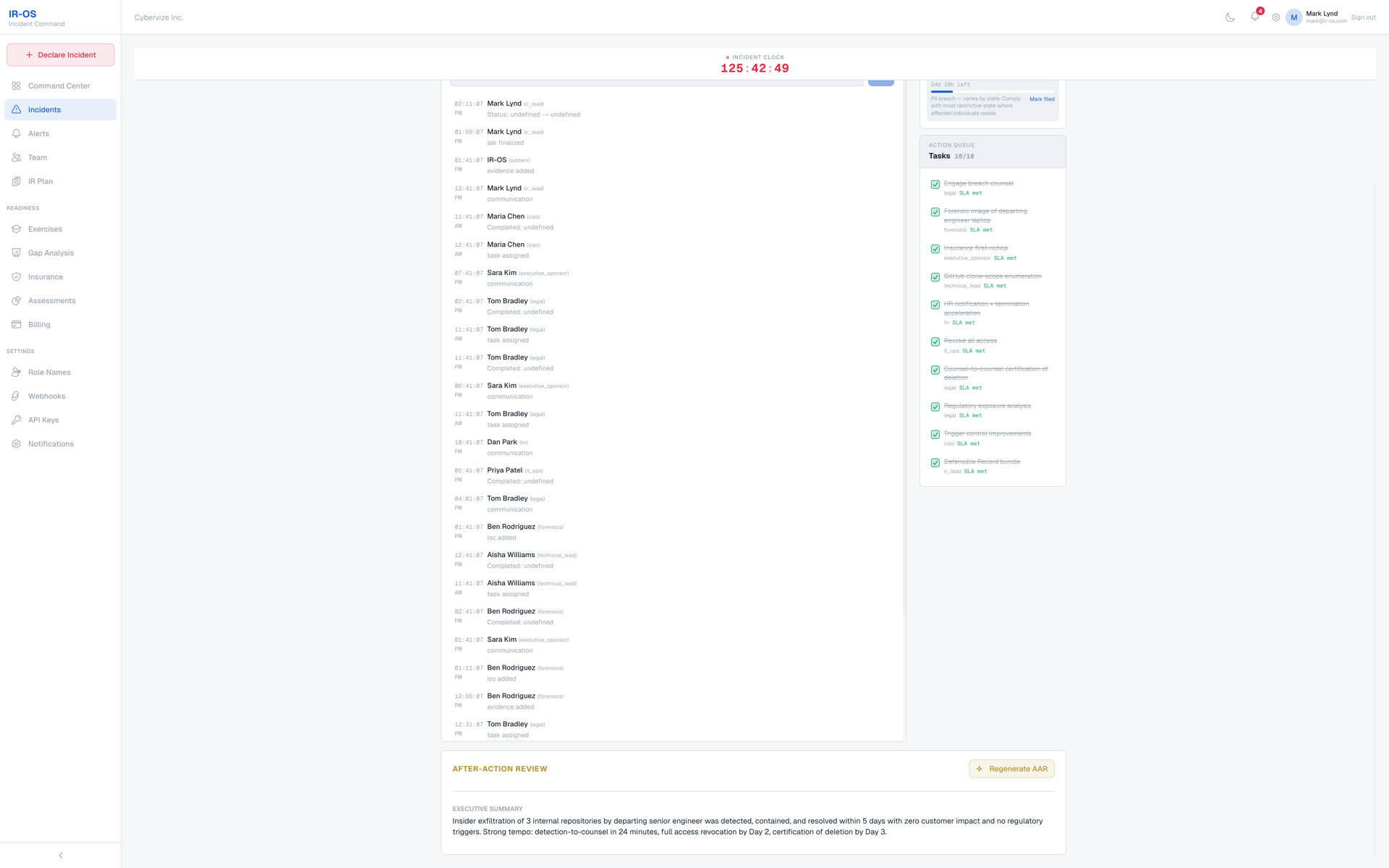
IR-OS after-action review surface with the executive summary, timeline, gaps rated by severity, and prioritized recommendations auto-generated at incident close
The after-action review, generated at close

Every exercise leaves a record.

Findings, severity, and owners are captured automatically. Readiness compounds instead of resetting each year.

Attested training

Role-aware modules covering the response lifecycle, IR roles, regulatory clocks, breach counsel, and after-action discipline. Every completion is attested and recorded, with re-attestation each year.

Was: Annual click-through e-learning. Now: Defensible per-member proof.

Facilitated drills

Five to ten minute scenario drills any team member can run anytime, across the common threat types. Each decision is judged, an after-action report is produced, and decision quality trends over time.

Was: One unscored tabletop a year. Now: Weekly drills, scored.

Compliance-grade tabletops

Formal exercises for the whole command team. Every finding becomes a tracked remediation item with an owner and a deadline. Produces the exact record your regulator, auditor, or carrier asks for.

Was: Lost slides, no follow-up. Now: Tracked findings, owners, deadlines.

One readiness trail

Every module completion, every drill score, and every tabletop finding lands on the same tamper-evident record as your live incidents. When a regulator, board member, or insurer asks "prove you were ready," you hand them a verifiable record instead of a slide deck.

For your role

Different decision-makers, different value. Pick yours.
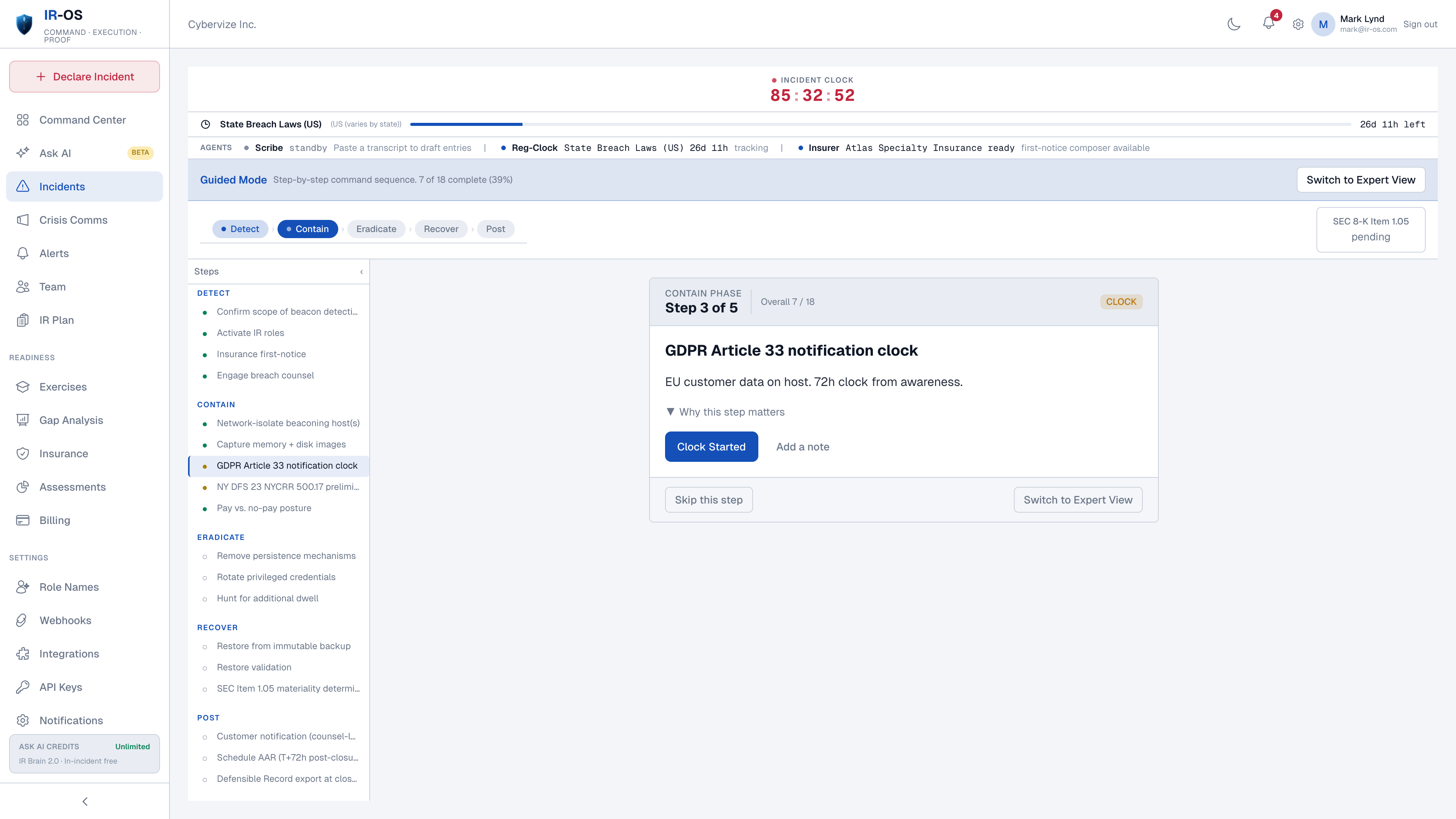
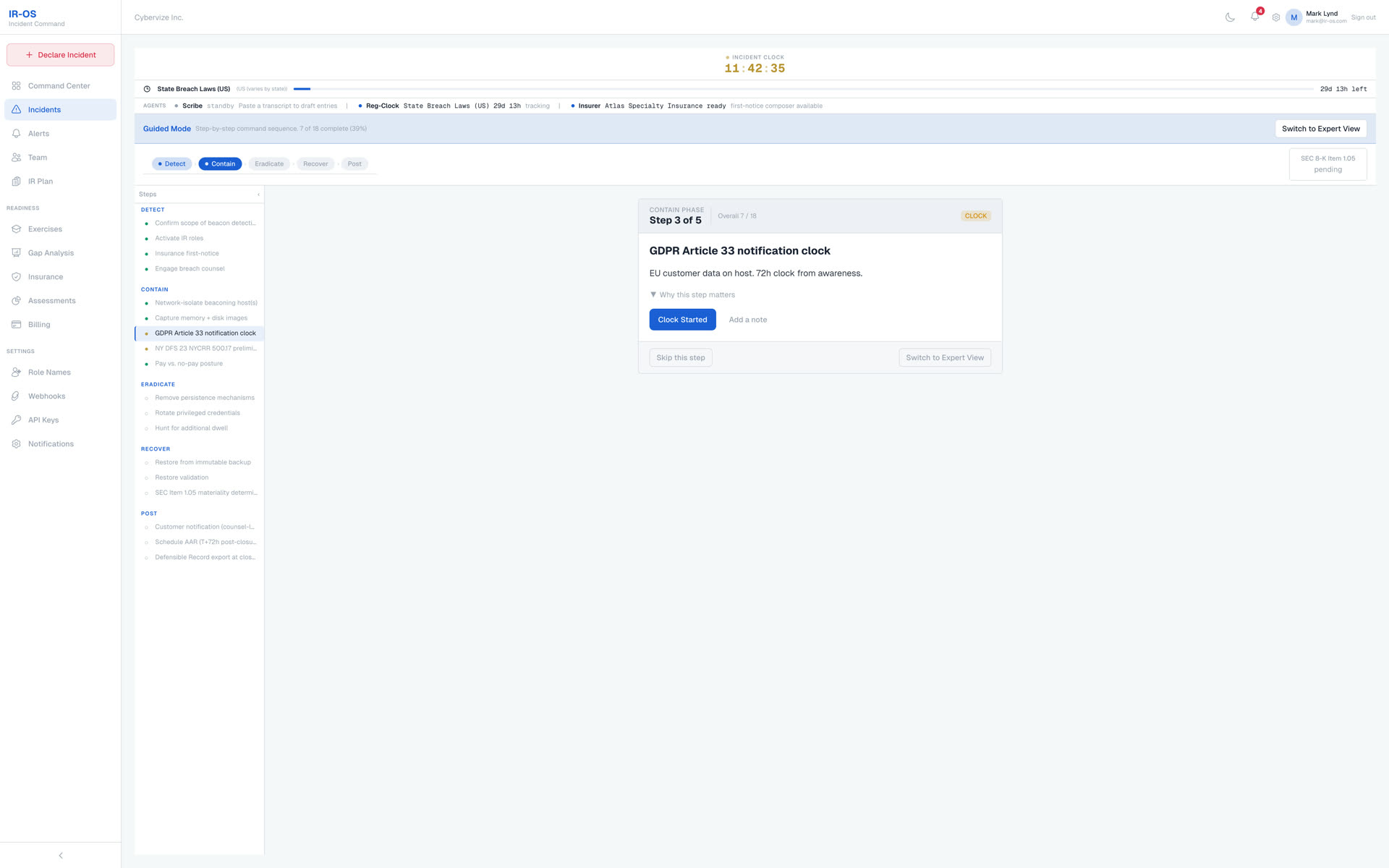
IR-OS incident detail view with the active runbook, assigned owners, and the next required step for each response role
One incident, every role sees its next step
CISO

Less response burden. Faster tempo.

The answer to "what now" is already on screen. No fifty-item runbook.

CIO

Faster recovery. Reportable to the board.

IT, security, legal, comms, and the business on one screen, with a record you can hand the board.

General Counsel

Keep legal review accountable.

Regulatory clocks tracked from your policy text, on a record built to authenticate the timeline.

CFO

A balance-sheet line, not a process metric.

Connect service disruption, response decisions, and policy requirements to the record your finance and insurance teams review.

CRO · Head of GRC

Attestations and audit-ready exports.

Audits, attestation, tabletops, and after-action reviews on one audit-ready record.

IR Lead

Five-minute setup. One owner per task.

The screen tells the team what to do next, so you can think two steps ahead.

Start your 7-day free trial

Five-minute setup · No sales call

Standards-anchored, not invented

Aligned with the standards your regulator and insurer expect

IR-OS plans, runbooks, and the audit trail are built on recognized cyber-IR standards. Pick the framework your program runs on. We carry the rest.

IR Plan Frameworks
NIST SP 800-61 Rev. 2
ISO/IEC 27035-1:2023
CISA Federal IR Playbook
SANS PICERL (SEC504)
IR-OS Expert (best-practice starting template)
Runbook + Threat Standards
OASIS CACAO 2.0 playbook serialization
MITRE ATT&CK technique tagging
MITRE D3FEND defensive countermeasures
CISA #StopRansomware advisories
OFAC ransomware decision guidance
Regulatory Clocks
SEC Item 1.05 (4 business days)
GDPR Article 33 (72 hours)
NY DFS 500.17 (72 hours)
HIPAA Breach Notification (60 days)
NIS2, DORA, state breach laws

Plus a Standards Watcher Agent on the roadmap that monitors NIST, ISO, CISA, MITRE, OASIS, OFAC, SEC, EDPB, and FBI IC3 daily, then drafts plan amendments with citations the moment something material changes.

Your IR program stops drifting the moment it is signed.

Pricing built for how you run incidents

Three plans. Every plan includes the defensible record, the IR Brain, and every AI capability. Pick the one that matches your team size and complexity, not a segment. Federal, SLED, and enterprise teams can procure on your paper via verified POs and standard contract vehicles, see the procurement options.

SUMMER OFFER 30% OFF 3 months with code SUMMER30
Pricing is going up soon. Subscribe now and your rate is locked through your first renewal, even after published rates rise.
30% OFF your first 3 months. Summer offer, use code SUMMER30 Book a demo
Monthly
Annual Save 2 months
Squad
Squad
For small teams that need AI superpowers and a defensible record without enterprise complexity.
$149/mo
  • Up to 4 users
  • 1 IRC team with 4 roles + 1 backup
  • 5 incidents per year, including exercises
  • 2 tabletop exercises per year
  • Plan templates for Expert, NIST, ISO 27035, CISA, and SANS workflows
  • AI Plan Coach + IRC Recommender
  • IR Brain queries (50/mo)
  • Hash-chained defensible record
  • Auto-generated after-action reports
  • PDF incident reports
  • Email + community support
or buy now, no trial needed
Theater
Theater
For enterprises and multi-national organizations. Tailored deployment, private IR Brain, configurable controls, and procurement on your paper. Priced to fit the scope and requirements of your program.
Contact Sales Custom pricing · tailored to your scope
  • Unlimited users
  • Unlimited IRC teams across business units
  • Unlimited incidents and tabletops
  • Everything in Command, plus:
  • Multi-BU requirements and board reporting: scope with sales
  • SSO / SAML / SCIM requirements: confirm delivery scope
  • Unlimited IR Brain queries
  • Private IR Brain corpus (your tabletops + AARs ingested)
  • NERC CIP + TSA + CIRCIA + DORA compliance mapping
  • API access, webhooks, custom integrations
  • Dedicated CSM + 24×7 support
  • Compliance package
Contact Sales or submit an RFP / purchase order

All plans include a 7-day free trial and a 30-day money-back guarantee. Card required up front, cancel anytime before day 7.

Are you a first responder, fire, EMS, or law enforcement agency? You may qualify for discounted pricing contact us and we'll take care of you. Also, state/local government, K-12, and higher ed is available upon request, you must reach out to us.

Government, SLED & Enterprise Procurement

Procure IR-OS on your paper.

Federal agencies, state and local government, K-12, higher ed, and enterprise teams can procure IR-OS through standard procurement instruments. We accept verified purchase orders and common federal and SLED procurement paperwork, including:

  • Purchase Orders (PO / SPO)
  • GSA Schedule and contract vehicles
  • Cooperative contracts (Sourcewell, NASPO, TIPS, BuyBoard)
  • SF-1449 / SF-33 federal forms
  • State and local standard POs
  • Enterprise MSA and invoicing

Submit the form below with your procurement details. We review every submission personally, verify the instrument, and respond within two business days with next steps, required documentation, and a point of contact for the rest of the process.

Submitting opens your email client with a pre-filled message to Mark for personal review. Your details are not stored on our servers.

Request prepared. Your email client should have opened with the procurement details pre-filled to [email protected]. Review, attach any supporting documents, and send. We review every submission personally and respond within two business days.

Pricing Questions

What's included in the free trial?
Every plan. Squad, Command, and Theater, includes a full-featured 7-day free trial. You get access to everything in your chosen plan with no feature restrictions. Card required up front, no charge for 7 days, cancel anytime before day 7.
What happens after the trial ends?
A payment card is required to start the 7-day trial. Unless you cancel before the trial ends, your selected subscription begins and your card is charged according to the checkout terms. Review your plan, renewal date, and cancellation options in billing.
Can I upgrade or downgrade at any time?
Yes. You can switch between Squad, Command, and Theater at any time from the Billing page. Upgrades take effect immediately and are prorated. Downgrades apply at the end of your current billing period.
Is there a long-term contract?
No. All plans are month-to-month with no long-term commitment. You can cancel at any time from the Billing page, and your plan remains active through the end of the current billing period.
What payment methods do you accept?
We accept all major credit cards (Visa, Mastercard, American Express, Discover) through Stripe for Squad and Command plans.

For federal agencies, state and local government, K-12, higher ed, and enterprise teams, we also accept verified purchase orders and common procurement instruments, including GSA Schedule and cooperative contracts (Sourcewell, NASPO, TIPS, BuyBoard), SF-1449 / SF-33, state and local standard POs, and enterprise MSA with invoicing.

Submit your details through the procurement request form above. We review every submission personally, verify the instrument, and respond within two business days.
What's included in the 30-day money-back guarantee?
If IR-OS doesn't measurably improve your incident coordination and readiness workflow within 30 days, we'll refund your payment in full. No questions, no friction. This applies to all plans.
Do you offer discounts for first responders or government?
Yes. Fire, EMS, law enforcement, state/local government, K-12, and higher education organizations may qualify for discounted pricing. No discount is applied automatically, you must reach out to us and we'll take care of you.
How does per-user pricing work?
Pricing is per-organization, not per-user. Each plan includes a user cap. Squad supports up to 4 users, Command up to 20, and Theater is unlimited. Every user within your cap has full access to all features included in your plan.
What counts as an "active incident"?
An active incident is any incident that has been declared and is not yet closed. On the Squad plan, you can have up to 5 incidents per year (real or simulated). Closing an incident does not reset the annual allowance. Command and Theater plans include unlimited incidents.
Can I add more users to my plan?
Each plan has a fixed user cap, 4 on Squad, 20 on Command, unlimited on Theater. If you need more users than your current plan allows, upgrade to the next tier from the Billing page. Upgrades are prorated and take effect immediately.

Frequently Asked Questions

Everything you need to know about IR-OS and incident command.

What is IR-OS?
IR-OS is a cyber incident command platform purpose-built for coordinating the human side of cyber incident response. It handles task assignment, role-based views, AI-assisted decision support, defensible timelines, readiness tracking, and after-action reviews, everything that happens between your SIEM firing an alert and the incident being closed. It is built by our team for cyber-IR specifically, so every workflow reflects what actually happens under pressure. Our Advisory Board includes Mark Lynd.
How is IR-OS different from PagerDuty, Jira, or ServiceNow?
PagerDuty routes alerts. Jira tracks tickets. ServiceNow manages workflows. None of them were built for incident coordination, the part where executives need status updates, legal needs notification timelines, comms needs hold/release decisions, and someone has to prove to regulators what happened and when. The IR-OS team built the platform to coordinate those responsibilities. See the full comparison hub for side-by-side breakdowns.
How is IR-OS different from FireHydrant (now part of Freshservice)?
FireHydrant is a strong SRE incident-management platform now becoming part of Freshservice ITSM via the December 2025 Freshworks acquisition. For deploys, outages, and infrastructure failures, that fit makes sense. For cyber incidents with regulators, insurers, and counsel waiting at the end, it is a structural mismatch: cyber-IR is a different category than ITSM. Most teams keep FireHydrant for SRE and run cyber-IR in IR-OS, with a webhook between them at the classification edge. See the full comparison or the migration path.
What standards does IR-OS align with?
IR-OS is standards-anchored, not invented. IR plan frameworks (pick one): NIST SP 800-61 Rev. 2, ISO/IEC 27035-1:2023, CISA Federal Government IR Playbook, SANS PICERL (SEC504), and IR-OS Expert (developed by our team with Advisory Board input). Runbook serialization: OASIS CACAO 2.0 with signed export. Threat taxonomy: MITRE ATT&CK and MITRE D3FEND tagging. Pre-built runbooks derived from the CISA Federal IR Playbook. Parallel regulatory clocks: SEC Item 1.05, GDPR Article 33, NY DFS, HIPAA, NIS2, DORA, CIRCIA, state breach laws. A Standards Watcher Agent on the roadmap monitors these sources daily and drafts plan amendments within 48 hours of material changes. See the full list at #standards.
What is a defensible incident record?
Every event in IR-OS is stored in an append-only timeline with SHA-256 hash chaining. Events cannot be edited or deleted after creation. Each event is cryptographically linked to the one before it, creating a tamper-evident chain of custody. This record stands up to regulatory scrutiny, insurer review, and legal discovery because it's mathematically provable that no one altered it after the fact.
How does the AI assistance work?
When you declare an incident, IR-OS reads your IR plan, the incident type, severity, and regulatory context to generate task suggestions, notification recommendations, and decision prompts. Every AI suggestion cites the section of your plan or regulation it's based on. AI suggestions are advisory, a human approves or dismisses every one. The system learns from your exercises and incident patterns to improve over time.
What is Ask AI in IR-OS?
Ask AI provides advisory help using available incident-response knowledge and authorized organization context. Use it to review a plan, explore readiness gaps, or prepare a response. Inspect the cited sources and confirm important facts: AI output may be incomplete or incorrect. Responders remain responsible for decisions.
How is Ask AI different from ChatGPT or Claude.ai?
ChatGPT and Claude.ai are general-purpose chatbots with no knowledge of your organization. Ask AI is grounded in your active IR plan, your open incidents, your tabletop AARs, your gap analysis, and your cyber insurance policy details, and every answer cites the regulatory or standards source it's based on. The models behind Ask AI never train on your prompts, plan, or tabletop content. Theater tier offers a private IR Brain corpus that ingests your own playbooks and AARs.
How many Ask AI queries do I get per month?
Squad: 50 IR Brain queries per month. Command: 400 IR Brain queries per month. Theater: unlimited. Ask AI is free during a declared incident on every tier. We don't meter you when you're mid-response.
What does "AI-native" mean for IR-OS? Isn't every platform bolting on an AI chat bubble now?
Most platforms add a chat bubble that wraps a generic LLM. IR-OS is AI-native in a specific sense: (1) every AI surface is grounded in the IR Brain RAG. NIST 800-61, ISO 27035, SEC Item 1.05, GDPR, CISA, OFAC, MITRE ATT&CK, and curated incident-response operational patterns, with inline citations, never fabrications; (2) the AI surfaces are specialized , a CISO Copilot, a Comms Copilot, a Compliance Monitor, an Ask-AI assistant, an AI IRC Recommender, each with its own guardrailed prompt; (3) IR-OS ships an MCP (Model Context Protocol) server so Claude Desktop, Claude Code, Cursor, and any MCP-compatible agent can query incidents, regulatory clocks, panel vendors, and the IR Brain natively, no screen-scraping, no CSV exports. The AI isn't a feature on the side; it's part of the architecture.
Can I connect IR-OS to Claude Desktop or Cursor directly?
Yes. The ir-os-mcp package is a standalone MCP server that runs locally (via npx) and talks to IR-OS over HTTPS with a scoped, revocable mcp:read API key you mint from Settings → API Keys. Six read-only tools are exposed in v0.1: list incidents, get timeline, compute regulatory clocks, list panel vendors, read plan phase, and search the IR Brain RAG. Write tools (declare incident, append timeline entry) require a separate mcp:write scope that's on the Phase 2 roadmap with explicit audit-log integration.
What's your security and compliance posture?
IR-OS runs on SOC 2 Type II certified infrastructure and inherits those controls. At the application layer we enforce strict tenant isolation, a tamper-evident cryptographic audit trail over governance events, least-privilege scoped integration keys, hardened identity and session controls, defense-in-depth across independent layers, and advisory-only AI surfaces that cannot modify platform state. Detailed security posture documentation is available to prospects under NDA at [email protected].
Can I use IR-OS in a HIPAA or regulated environment?
The underlying infrastructure we run on is HIPAA-eligible when the relevant BAAs are executed. IR-OS BAAs are available to enterprise customers as part of the Theater tier or a custom contract, email [email protected] to start that conversation. For regulated customers who need private IR Brain content (org-specific playbooks, runbooks, regulator correspondence), the Theater tier supports a private brain partition distinct from the shared public corpus.
Do I need an existing IR plan to use IR-OS?
No. IR-OS ships with a battle-tested IR plan template grounded in incident-response operational best practice. You can use it as-is, customize it to your organization, or upload your own plan. The platform adapts its AI suggestions and task generation to whatever plan you have in place.
How long does setup take?
Most teams are operational in 15 minutes. Import your team roster, choose or upload your IR plan, set notification preferences, and you're ready to declare your first incident or run your first tabletop exercise. There's no weeks-long implementation or professional services engagement required.
What types of incidents does IR-OS handle?
Data breaches, ransomware, insider threats, system outages, third-party compromises, physical security events, and regulatory incidents. Each incident type has tailored workflows, task templates, notification sequences, and regulatory mappings. You can also create custom incident types with your own workflows.
How does the readiness dashboard work?
Four traffic-light indicators track your organizational readiness: exercise compliance (have you tested recently?), open remediation gaps (from exercises, assessments, and AARs), overdue assessments, and insurance expiry. Green means ready. Amber means attention needed. Red means act now. It gives leadership a single-glance view without digging through multiple reports.
Can I run tabletop exercises in IR-OS?
Yes. Log exercises with attendees, scenarios, findings, and action items. Every finding automatically creates a remediation item in the gap tracker. Over time, IR-OS builds a complete picture of your readiness posture by connecting exercises, assessments, real incidents, and after-action reviews into one continuous improvement loop.
What happens after an incident closes?
IR-OS auto-generates a structured after-action review (AAR): executive summary, timeline summary, what worked well, gaps identified with severity ratings, SLA compliance analysis, regulatory compliance status, and prioritized recommendations. Each identified gap can be pushed to the remediation tracker with one click, closing the loop from incident to improvement to verification.
Is my data secure?
IR-OS enforces strict tenant isolation at the database layer every query is bound to the caller's organization before any row returns. Data is encrypted at rest and in transit. The append-only event store ensures no one, including administrators , can alter the incident record after creation. Your incident data never leaves your isolated tenant. Full security posture documentation available under NDA at [email protected].
What's the trial and guarantee?
Every plan. Squad, Command, and Theater, includes a 7-day free trial and a 30-day money-back guarantee. If IR-OS doesn't measurably improve your incident coordination and readiness workflow within 30 days, we'll refund your payment in full. No questions, no friction. Card required for the trial, cancel anytime before day 7.
Do you offer discounted pricing for first responders or SLED?
Are you a first responder, fire, EMS, or law enforcement agency? You may qualify for discounted pricing, contact us and we'll take care of you. Also, state/local government, K-12, and higher ed is available upon request, you must reach out to us.

Still evaluating options? Compare IR-OS side-by-side.

Cytactic · BreachRx · Cydarm · ServiceNow SIR · FireHydrant · PagerDuty · incident.io · spreadsheets

See every comparison →

Give your leadership team a response they can lead together.

Evaluate IR-OS against the decisions your team needs to make: what to prioritize, how to restore critical services, and what evidence supports the next update.

CISOCan you identify the next decision and its owner?
CIOCan you see what is blocking service recovery?
Head of GRCCan you trace an obligation to its reviewed evidence?

Not ready yet? Take the free 2-minute IR-readiness assessment. Get an AI-graded review and the 72-Hour Playbook.

Trial requires a card. Cancel before day 7 to avoid a subscription charge. Explore the demo first, no account needed.